

Managing product information in a BigCommerce store can become time-consuming when multiple products need to be updated. Editing products individually requires extra effort and increases the risk of inconsistent product data and manual errors.
BulkFox simplifies this process with its Bulk Update functionality, allowing store owners to update multiple products efficiently through a spreadsheet-style interface. Whether you need to adjust prices, update inventory, or modify product details, BulkFox helps streamline routine catalog management.

Simplifying Repetitive Product Editing
The Problem with Repetitive Product Editing
Updating products one by one can be challenging, especially for stores with large product catalogs. Store owners may need to repeat the same changes across multiple products, which takes time and increases the possibility of mistakes.
For example, changing prices, updating stock quantities, or correcting product names individually can become a lengthy process when managing hundreds of products.
How BulkFox Simplifies Product Updates
Efficient Bulk Editing: BulkFox allows users to update multiple products at once, reducing the need for repetitive manual edits.
Flexible Product Selection: Use filters and checkbox selection to identify the products that need updating, helping you focus on the relevant items in your catalog.
Update Multiple Products with Greater Flexibility
The Challenges of Updating Multiple Products
A BigCommerce catalog contains many types of product information, including pricing, inventory, descriptions, and product conditions. Keeping these details accurate and consistent requires regular maintenance.
When updates are handled separately, it can be difficult to manage changes efficiently across the catalog.
A Smarter Way to Update Products
Same-Field Bulk Updates: Apply the same change to a selected field across multiple products. For example, update the prices of several products in one operation.
Different-Field Bulk Updates: Modify different product fields as needed, such as product names, descriptions, prices, and inventory quantities.
Spreadsheet-Style Editing: Work with product information in a familiar table-based interface, making it easier to select cells or rows and apply the required changes.
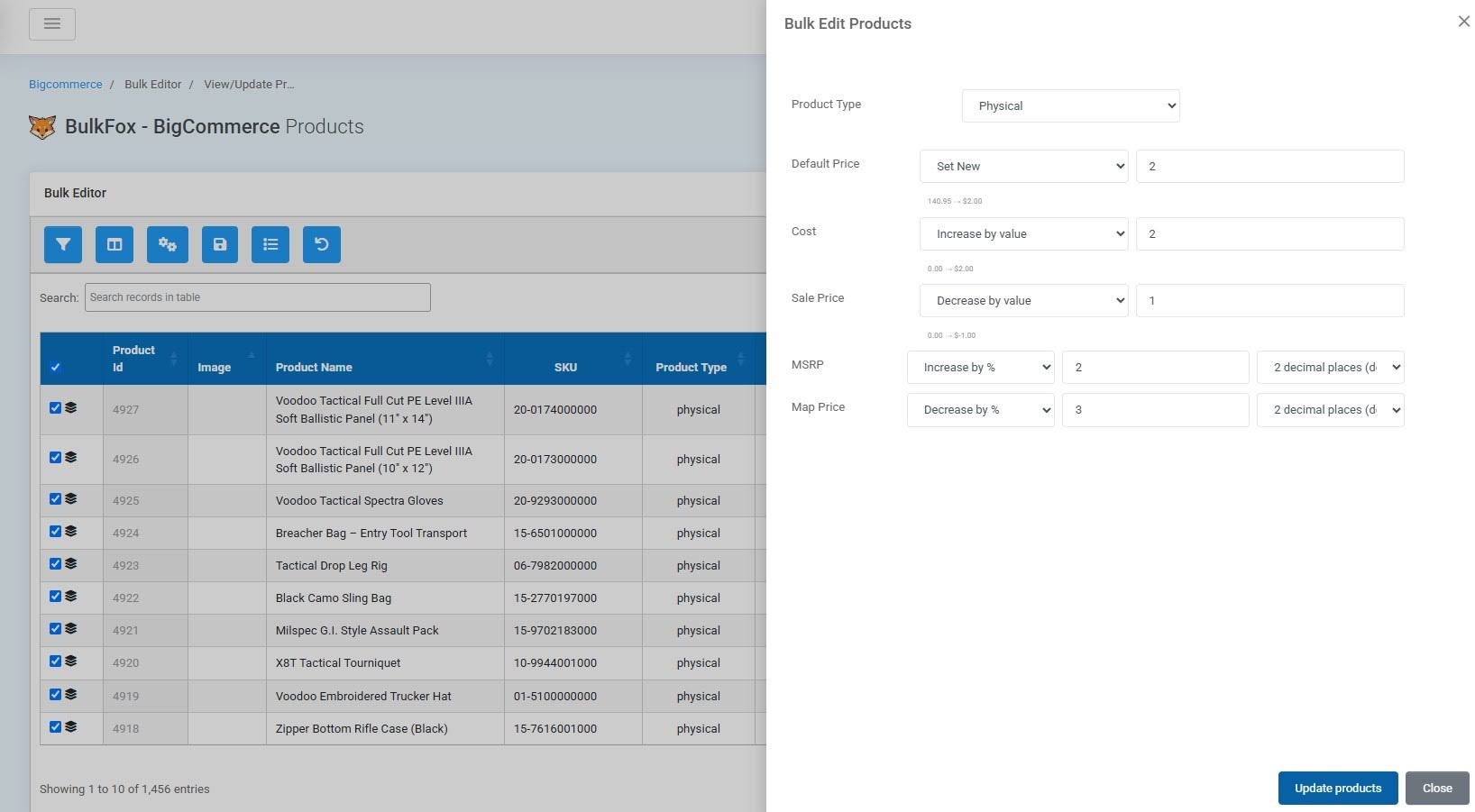
Manage Essential Product Information in One Place
How BulkFox Makes It Easier
Update Key Product Fields: BulkFox supports bulk updates to important product information, including:
- Product name
- Price
- Inventory
- Description
- Product condition
- Other supported product fields
Reduce Repetitive Work: Instead of opening and editing each product separately, users can select the relevant products and apply changes through the BulkFox interface.
A Simple Workflow for Bulk Updates

- Open BulkFox: Access the Bulk Editor from your BigCommerce store.
- Find the Products: Use filters and checkbox selection to identify the products that require changes.
- Select Fields or Rows: Choose the relevant cells or product rows for editing.
- Apply the Updates: Enter the required values or apply changes to the selected products.
- Review the Changes: Check the updated product information to ensure it matches your requirements.
This workflow helps store owners manage routine catalog updates with less manual effort.
Best Practices for BulkFox Bulk Updates
Filter Before Updating: Use filters to narrow down the products you want to modify. This helps prevent unnecessary changes to unrelated products.
Verify Product Selection: Review the selected products before applying bulk changes, especially when updating prices or inventory quantities.
Check Updated Values: After completing an update, verify the affected fields to confirm that the changes were applied correctly.
Keep Product Data Consistent: Use bulk updates to maintain consistent pricing, product descriptions, and other relevant information across your catalog.
Conclusion
Maintaining a BigCommerce product catalog does not have to involve repetitive, time-consuming edits. With BulkFox Bulk Update functionality, store owners can update multiple products, modify essential product fields, and manage catalog changes through a convenient spreadsheet-style interface.
By simplifying product selection and supporting both same-field and different-field updates, BulkFox helps make everyday product management more efficient and organized.