
BigCommerce’s native import and export tools have some friction points: massive files with dozens of unwanted columns, delicate template requirements, and the constant risk of overwriting live data before you can catch a mistake.
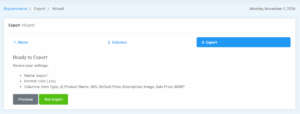
The Bulkfox app enhances BigCommerce by providing a purpose-built import and export engine designed to make bulk data transfers faster, cleaner, and significantly safer. Here is a breakdown of how Bulkfox refines import and export use cases for modern BigCommerce stores
Safe Import with a Guided Mapping Wizard
The Challenge with Native Import
Native imports are notoriously unforgiving with column headers. If a column name has a typo, an unexpected space, or non-standard naming from an external supplier’s inventory feed, the import can fail completely or map data into the wrong fields.
How Bulkfox Streamlines It
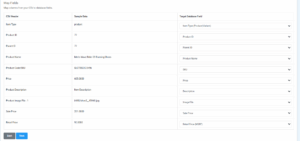
- Guided Field Mapping: When you upload an updated CSV, Bulkfox uses an intelligent mapping wizard that pairs your file’s columns with BigCommerce product attributes.
- Supplier Feed Flexibility: Easily map external files (like dropshipper inventory lists or vendor catalogs) directly to your BigCommerce fields without having to manually re-type every column header in Excel.
“Review Before You Publish”: Staging Your Imports
The Native Import Risk
In native BigCommerce workflows, clicking “Import” pushes changes straight to your live storefront. If you misplaced a decimal place on a price column or mismatched SKUs, your customers see those errors immediately.
The Bulkfox Safety Net
- Staged Import Previews: When you import a CSV via Bulkfox, the changes do not immediately overwrite your store. Instead, the data is loaded into Bulkfox’s staging environment.
- Side-by-Side Review: You can visually inspect the incoming edits, verify prices and inventory numbers, and catch data errors before committing them.
- Push to Store on Demand: Once you verify the import data is accurate, synchronize the changes directly to BigCommerce via the API in a single click.
Offline Editing for Complex Variants and Custom Fields
Variant & Custom Field Integrity
Managing variant rows (Item Type = SKU) and custom field attributes in raw CSV files often causes formatting headaches and severed parent-child relationships.
- Structured Variant Exports: Bulkfox exports parent and variant relationships cleanly, ensuring option SKUs and price modifiers are clearly grouped for offline spreadsheet editing.
- Custom Field Flexibility: Export specific custom fields into dedicated, legible columns, edit them in bulk using Excel formulas or find-and-replace, and import them back through the wizard without delimiter corruption.
Best Practices for Bulkfox Import & Export
- Leverage Pre-Filtering: Before clicking export, use Bulkfox filters to isolate only the products you intend to edit to keep files small and workflows fast.
- Review the Staged Data: Always take advantage of Bulkfox’s staging step to review updated prices or stock levels visually before pushing changes to your live catalog.
Conclusion
Exporting and importing spreadsheets remains one of the most reliable ways to maintain an e-commerce catalog, but it shouldn’t feel like navigating a minefield. Bulkfox turns routine catalog imports and exports into a controlled, error-free process.